Wireless Network Configuration - Windows Wireless Setup


  1. From the desktop, left-click on the wireless icon on the bottom right corner of your taskbar and click on Network and Internet settings.
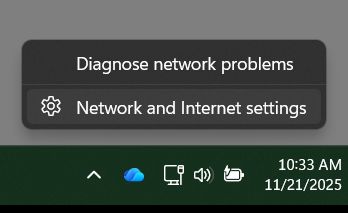
Screenshot of a computer's network settings menu displaying options to diagnose network problems and access network and internet settings.

2. Click on Wi-Fi then Show available networks. You should see a list of SSID:  Select eduroam and click Connect (might ask you to click Connect twice).

3. Enter your ssoid@umsystem.edu and password or UM-AD\ssoid. 

Screenshot of a Wi-Fi settings menu displaying available networks and a prompt for user credentials. 

4. You might get a message asking if you want to Continue Connecting, go ahead and say Connect.